
FAQs
How do I arm my Gemini control panel for 'instant' protection?
When arming with Instant Protection, the exit delay will remain in effect, allowing exit of the premises just after arming. Instant protection cancels the entry delay on the Entry Zone(s), therefore, when the system is armed with instant protection, opening an entry door triggers an immediate alarm.
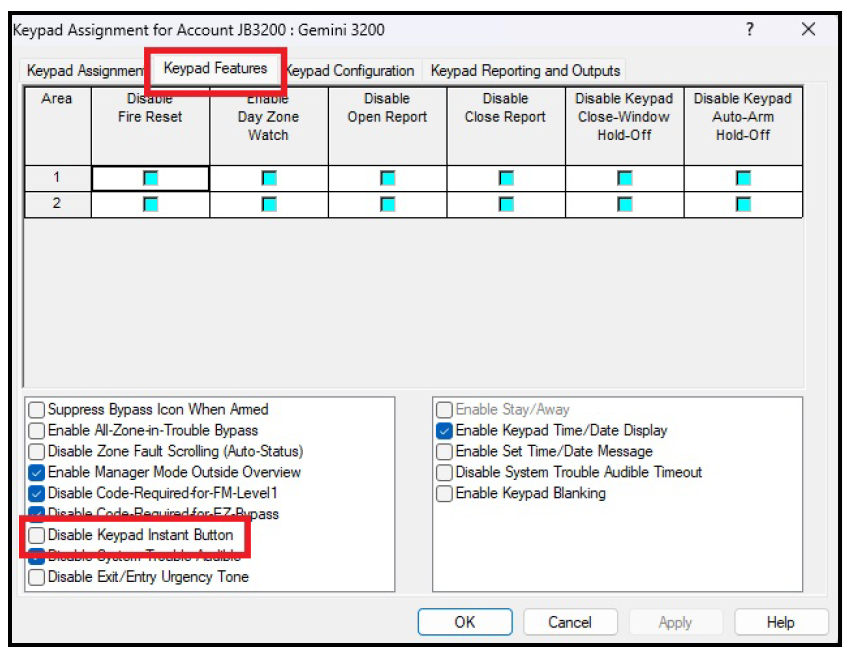
Control panel programming is the same for the Gemini GEM-P816, GEM-P1632, GEM-P1664, GEM-P3200, GEM-P9600, GEM-X255 control panels, and all Gemini C-Series (GEMC) control panels programmed as Burglary and Combination Burglary / Fire. Launch PCD-Windows Quickloader software, select Keypad Assignment > Keypad Features and ensure the Disable Keypad Instant Button is NOT checked.
Arming with instant protection can be performed with both "Classic" series keypads (GEM-RP1CAe2, GEM-RP2ASE2, GEM-RP3DGTL, or GEM-RP4 series) and with "K Style" keypads (GEM-K1CA, GEM-K2AS, GEM-K3DGTL, or GEM-K4 series).
- To arm with instant protection using a "Classic" series keypad, press INSTANT (PRIOR/NO) prior to arming, or at any time after the system is armed.
- To arm with instant protection using a "K Style" keypad, press / hold down the STAY (NEXT/YES) button for 2 seconds or at any time after the system is armed.
While armed, the keypad window displays "SYSTEM ARMED" and the red ARMED light will flicker rapidly.