
FAQs
How do I program the FWC-FSLC-SCH Smoke, Co and Heat Detector using the FireLink Cloud (www.firelinkpro.com)?
Important: The control panel firmware version must be V91.21 or later. In addition, the GEMC-FW-SLC Fire SLC circuit board firmware version must be V4.4 or later; for GEMC-FW-SLC update instructions, see this link: https://tech.napcosecurity.com/techlibrary/docdetails/brand_id/1/doc_id/3726
To program the FWC-FSLC-SCH Smoke, Co and Heat Detector:
- Use your browser to visit the FireLink Cloud website (www.firelinkpro.com) and select "Zone Assignments":

- Program the next 3 zones as shown in the example below, i.e., as "Smoke", "Heat Alarm", and "CO Alarm". Note: The CO zone must not trip the same NAC as a Fire zone or Waterflow zone because they trigger different evacuation signals.

- Each transmitter has a unique RF ID code (printed on the sensor module and/or on the rear case) that distinguishes itself to the receiver. Enter this code and its check-sum digit in the RF / SLC ID Point field (in this example, this RF ID code ends with a "-1"; likewise, the Device Point field contains a "1") . Be sure to enter all numbers and/or letters, including leading zeros, if any. Note: In the example shown in the images above and below, for zone 17, the Device Address for "Smoke" is "17".
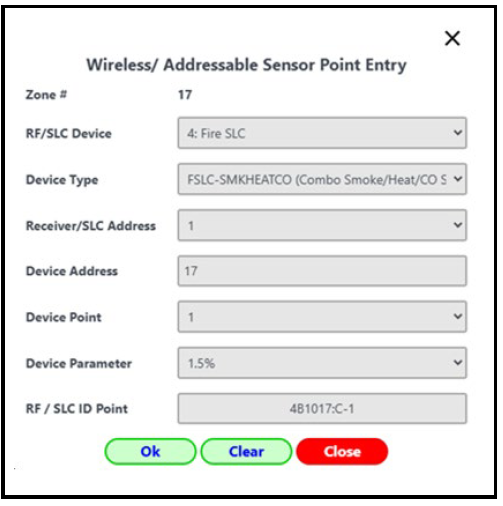
- For the Zone # 18 (Heat Alarm), select the RF / SLC ID Point field and enter the same RF ID code as in the previous step, but notice this entry ends with "-2" (the Device Point is also "2"). The Device Address remains as "17, the same as the previous entry:
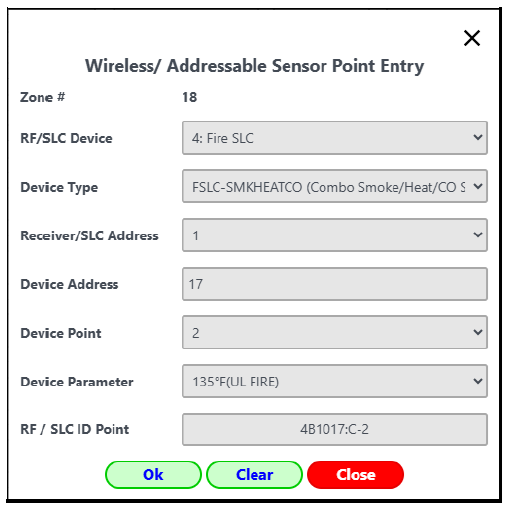
- For the Zone # 19 (CO Alarm), select the RF / SLC ID Point field and enter the same RF ID code as in the previous step, but notice this entry ends with "-3" (the Device Point is also "3"). Notice also the Device Address remains as "17", the same as the previous entry:
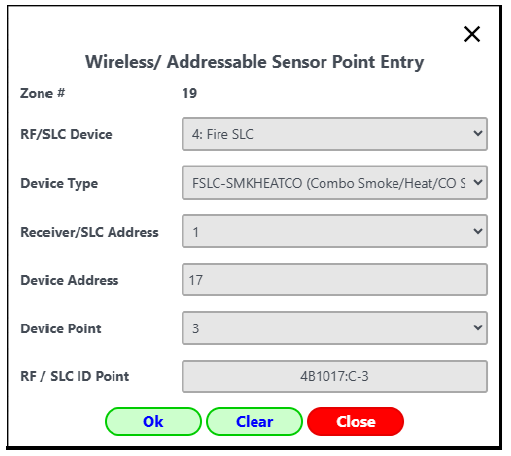
Note: When programing the model FWC-FSLC-SH Smoke and Heat Detector, perform above steps 1-4 only (this model does not contain a CO sensor).