
FAQs
How do I delete an existing Prima account that appears in the Prima dealer portal website (www.NapcoPrima.Pro)?
Perform the deletion in the NAPCO ComNet website (www.NapcoComNet.com).
Note: Although 'deleted' accounts are disabled and removed from the Prima portal, the accounts are not completely erased; they are hidden in searches by default and can be viewed later if needed.
- Log in to the ComNet website and search for the account by Unit ID (the Unit ID is located on the back of the Prima Super Panel under the battery cover, and is also included in the paperwork provided with the Super Panel factory packaging). Type the ID number in the Device ID field and select Go.
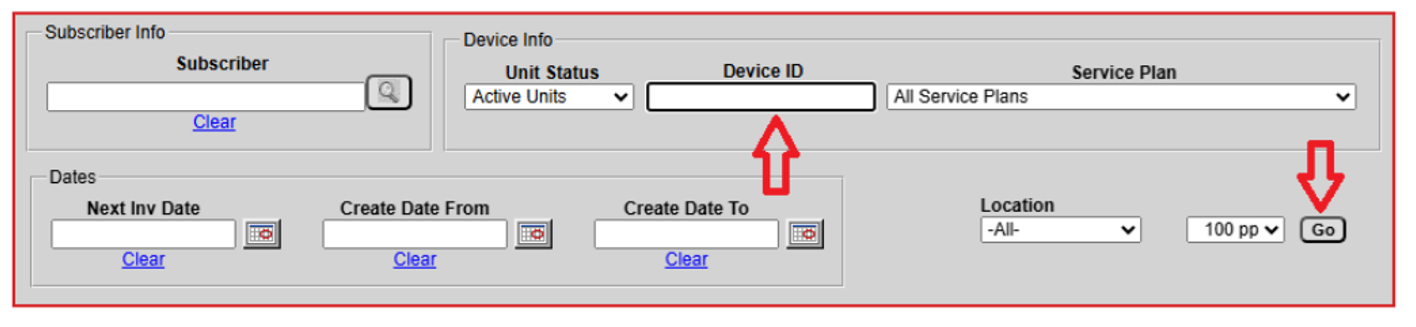
- When found, select the Device ID number.

- In the screen that appears (example shown below), scroll to the bottom and select Suspend.
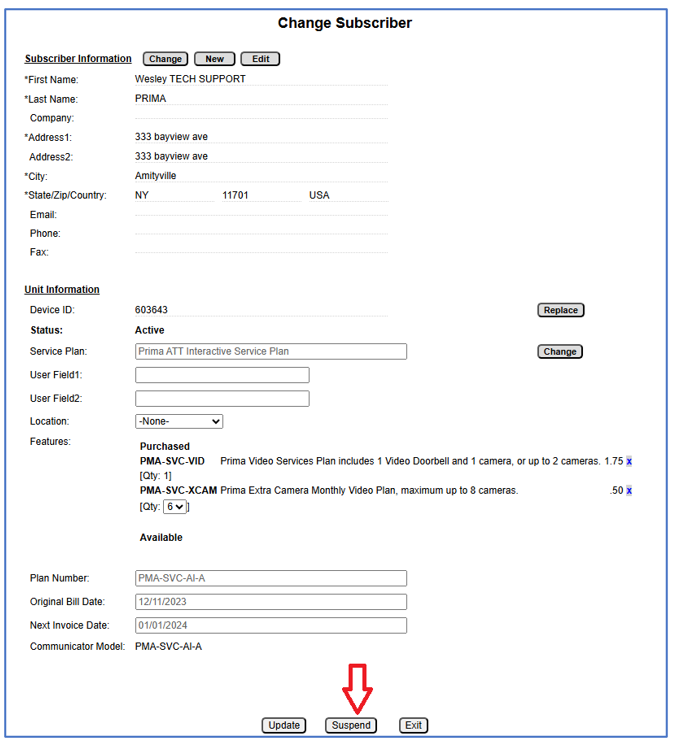
The selected Prima account is immediately suspended and is essentially 'deleted'. Later, if you wish to review the account in the Prima Portal, you must select Include Deleted Accounts (see image below). Note: A newly suspended account may take up to 15 minutes before it is available for review.
